Secrets
A secret is an encrypted-at-rest value (an SNMP community, a set of basic-auth credentials): typed, owned at one scope, and resolved down the cascade so the most-specific owner wins onto a component. Its plaintext sibling is a variable. The model underneath is config and credentials.
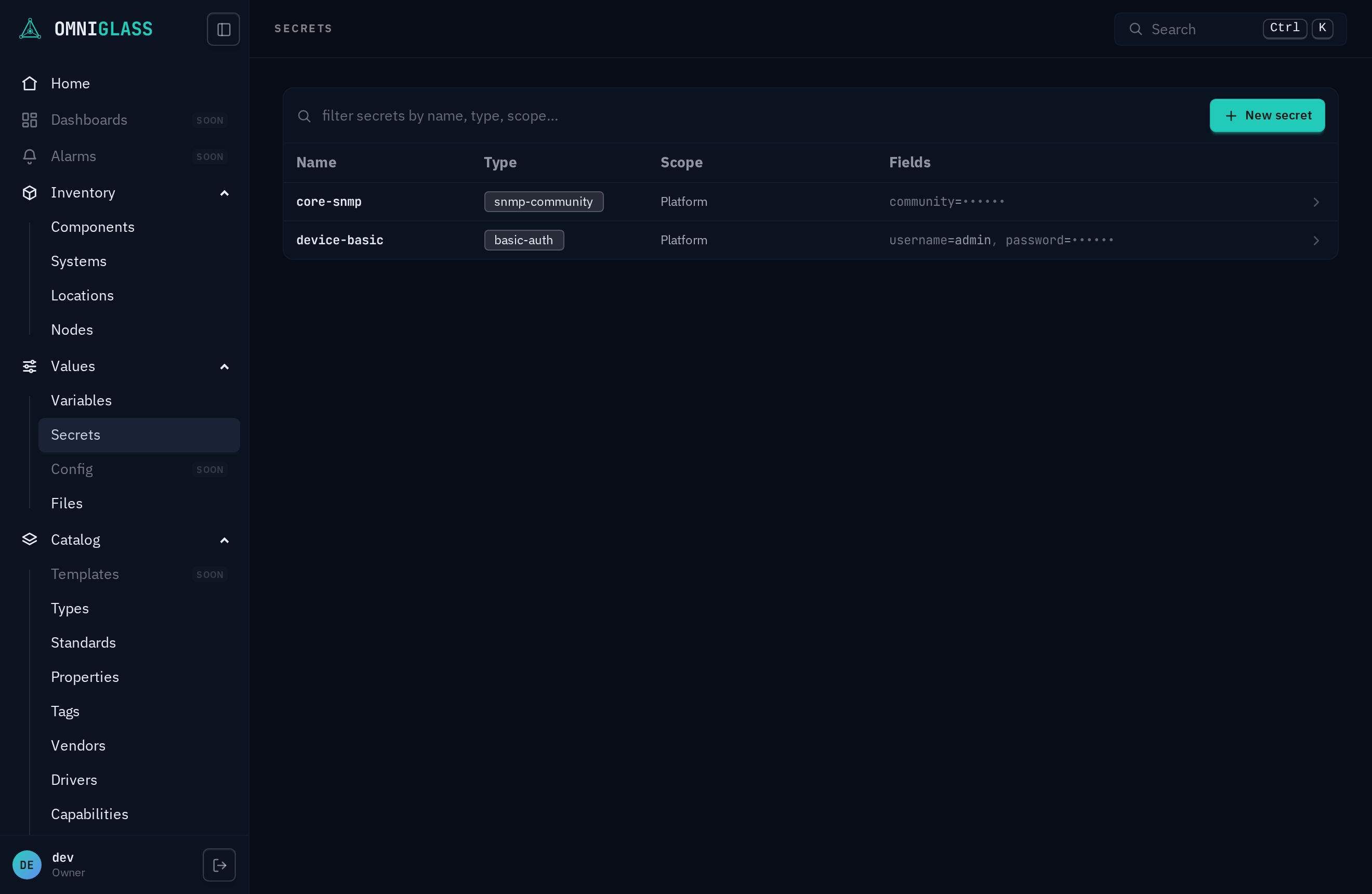
Values > Secrets (with secret:read) is the directory of every secret
you may see: a typed, encrypted-at-rest value owned at one scope and resolved down the cascade. Each row
shows its name under its label where it has one, a type badge, a scope label (Platform,
or the location / component it attaches to), and a masked field preview (••••••, never a
value). The list reads in label order, with the secrets that carry none at the end. The same chip filter as the
inventory narrows the list. secret is a sensitive resource off the *:read floor, so a plain
read-everything viewer does not see this page at all; an operator/deploy holds an explicit
scoped secret:read and sees the secrets in its subtree. The directory is scope-filtered (you see
your subtree, not the whole fleet) and hides admin-sensitive secrets (platform credentials) from
anyone below admin, so their existence and field names never appear to an operator.
-
New secret (with
secret:create) opens a create drawer: give it a name (lowercase letters, digits, and hyphens, no dots and no underscores, unique per owner, and what the cascade resolves by), pick a type (the shape; the shipped set below renders from the seed itself), a scope (platform, location, or component; a secret has no system band, ADR-0052), then the entity itself from the shared indented tree picker, and finally the type’s operator fields (a password input for a secret field). A platform secret is install-wide, so it needs an all-scope grant plusplatform:createon top ofsecret:create; without it the Platform scope is not offered at all, and the form says which capability that takes. Each type carries a sensitivity default: an integration type likeoauth2-clientcreates an admin-sensitive secret (admin/owner-only), a device type an operational one. Creating an admin-sensitive secret requires the admin tier, so an operator can mint only operational secrets. -
Pick a row to open its detail blade on the shared action rail. Fields render masked; Reveal secret values (with
secret:reveal) runs the audited decrypt and shows the plaintext with a per-field Copy. An operator reveals the operational secrets in its scope; an admin-sensitive secret is admin/owner-only (it is hidden from the directory and a non-disclosing not-found on reveal for anyone below admin). Every reveal is written to the audit trail. -
The footer Edit pencil (with
secret:update) opens inline field edit; a blank secret field keeps its stored value, so you rotate one field without re-entering the rest. Delete (withsecret:delete, admin and owner) sits in the footer behind a confirm. On a Platform row both also need the matchingplatform:<action>; holding only the secret half leaves the blade read-only with a note naming what is missing.Type Fields Admin-sensitive default snmp-community(SNMP Community)community(secret)no basic-auth(Basic Auth)usernamepassword(secret)no oauth2-client(OAuth2 Client)client_idclient_secret(secret)yes
From the CLI the same surface is omniglass secret list / create / update / reveal / copy /
delete and omniglass secret-type list (see the CLI reference).