

Roles, groups, and grants
Access is a grant: a role at a scope. You assign a grant to a user directly, or to a group the user belongs to; the scope decides which slice of the fleet the grant reaches. This page is the three parts of that: the roles you can assign, the groups that share a grant across a team, and the grant builder that stages and commits both. The model underneath is identity and access.
Admin > Roles (with role:read:admin) is the catalog of the built-in roles on the same list surface as Users
and Groups: a directory row per role (its name, whether it is official, what it inherits, and how many
permissions it confers), ordered least to most powerful (viewer, operator, deploy, admin, owner). Open a row for
its read-only blade, which shows the role’s permissions as a net view against the full set of
capabilities the platform enforces (the permission universe). A Held / Missing / All toggle switches
between the permissions the role holds, the ones it is missing, and the whole universe with each lit or
dimmed, listed one per line in alphabetical order. Held is resolved the same way the role acts at runtime
(inheritance, wildcards, and the read floor applied), so viewer holds only the reads it can reach (no
secret:read, no admin-tier reads), admin holds nearly everything, owner holds all of it, and an
admin-sensitive permission like audit:read:admin is tinted for its :admin tier. It is a teaching surface: it
renders the real seeded roles against the real routed capabilities, not a static table. Custom-role creation and
editing are coming; today the built-in roles are read-only.
The same matrix, rendered here from the seed itself (make gen) with inheritance, wildcards, and
the read floor resolved exactly as the authorizer resolves them at runtime:
Viewer (viewer): Read-only access to everything. The floor every other role inherits.
Effective permissions (1):
*:read
Operator (operator inherits viewer): Day-to-day operations: create or edit components, interfaces, secrets, variables, and the property, metric, event, and command catalogs, and issue commands in scope. Sees and reveals the device secrets in its scope (never the admin-sensitive platform credentials). Inherits Viewer.
Effective permissions (26):
component:createcomponent:updatecomponent:renamecomponent:moveinterface:createinterface:updatesecret:readsecret:revealsecret:createsecret:updatevariable:createvariable:updateproperty_type:createproperty_type:updatemetric_type:createmetric_type:updateevent_type:createevent_type:updatecommand_type:createcommand_type:updatecommand:issuealarm:acknowledgetelemetry:pushfile:createfile:delete*:read
Deploy (deploy inherits viewer): Integrator or field tech: create, update, rename, and move on locations, systems, and components, and no delete. A grant of it reaches ONE tier, the tier it is scoped at. Granted at a location with the "under only" operator, it builds out and edits the rooms under that location, never the location itself, plus the secrets those locations own; it reaches no system and no component there, not even to read one. Building those out inside a building takes a system-scoped and a component-scoped grant of this role beside the location one, until a grant's scope can span tiers. Inherits Viewer, whose read floor is scoped the same way.
Effective permissions (18):
location:createlocation:updatelocation:renamelocation:movesystem:createsystem:updatesystem:renamesystem:movecomponent:createcomponent:updatecomponent:renamecomponent:movesecret:readsecret:revealsecret:createsecret:updatefile:create*:read
Administrator (admin inherits operator): Manages the fleet, users, roles, and grants: full create, update, and delete on locations, systems, and components, and on principals, credentials, grants, and roles. Deliberately NOT the superuser: it cannot grant a role above its own tier, so it cannot make itself owner. Inherits Operator.
Effective permissions (81):
component:deleteinterface:*task:*system:createsystem:updatesystem:deletesystem:renamesystem:movelocation:createlocation:updatelocation:deletelocation:renamelocation:moveprincipal:*principal:read:adminprincipal:purge:adminsecret:>file:>variable:*platform:*settings:readsettings:updateprincipal_grant:*principal_group:*principal_group:read:adminnode:*role:read:adminaudit:read:adminproperty_type:*metric_type:*event_type:*command_type:*command:*location_type:createlocation_type:updatelocation_type:deletecomponent_type:createcomponent_type:updatecomponent_type:deletesystem_type:createsystem_type:updatesystem_type:deletevendor:createvendor:updatevendor:deletedriver:createdriver:updatedriver:deleteproduct:createproduct:updateproduct:deletestandard:createstandard:updatestandard:deletetag:*component:createcomponent:updatecomponent:renamecomponent:moveinterface:createinterface:updatesecret:readsecret:revealsecret:createsecret:updatevariable:createvariable:updateproperty_type:createproperty_type:updatemetric_type:createmetric_type:updateevent_type:createevent_type:updatecommand_type:createcommand_type:updatecommand:issuealarm:acknowledgetelemetry:pushfile:createfile:delete*:read
Owner (owner): Full control of everything, the break-glass superuser (the tail wildcard, so it covers every capability at every tier, including admin-sensitive ones and future resources). At least one active owner always exists, and an owner account cannot be impersonated.
Effective permissions (1):
>
Groups
Section titled “Groups”Admin > Groups (with principal_group:read:admin) is the admin surface for user groups: a group holds
role @ scope grants, and every member inherits them, so you assign access to a team once instead of per
user. Pick a row to open the group’s blade: its members (add any principal, remove one, or open a member to
stack that user’s blade over the group) and its grants, built with the same grant builder the user detail uses. A grant added to the group takes effect for every member
immediately, and is bounded by the same rule as a direct grant (you cannot grant a role above your own tier).
New group creates one (name, label, description); the name is an ordinary entity name
(lowercase letters, digits, and hyphens, no dots and no underscores), while the label is free
text. The name is not patchable once the group exists: moving it is POST /principal-groups/{id}:rename,
gated by principal_group:rename rather than :update (ADR-0077), and the
console’s group blade shows the name read-only. The new group then opens
directly in edit mode, so you add its members and grants right away and one Save commits them (they
are attached to the group once it exists, so creating and populating stay one flow). Deleting a group drops
the memberships and the inherited grants, but members keep their own direct grants.
On a user’s detail, grants split into two: the ones you granted the user directly (editable in the grant
builder) and the ones inherited from a group (shown read-only, tagged from <group>), so it is always clear
where a user’s access comes from. To change an inherited grant, edit the group, not the user.
From the CLI the surface is omniglass principal-group list / get / create / update / rename /
delete, plus its
member and grant subcommands (see the CLI reference).
The grant builder
Section titled “The grant builder”Users and Groups share one control for assigning access. With principal_grant:create / :delete, the
detail panel’s grant builder stages a set of changes and applies them only on Save, so there are no
accidental edits.
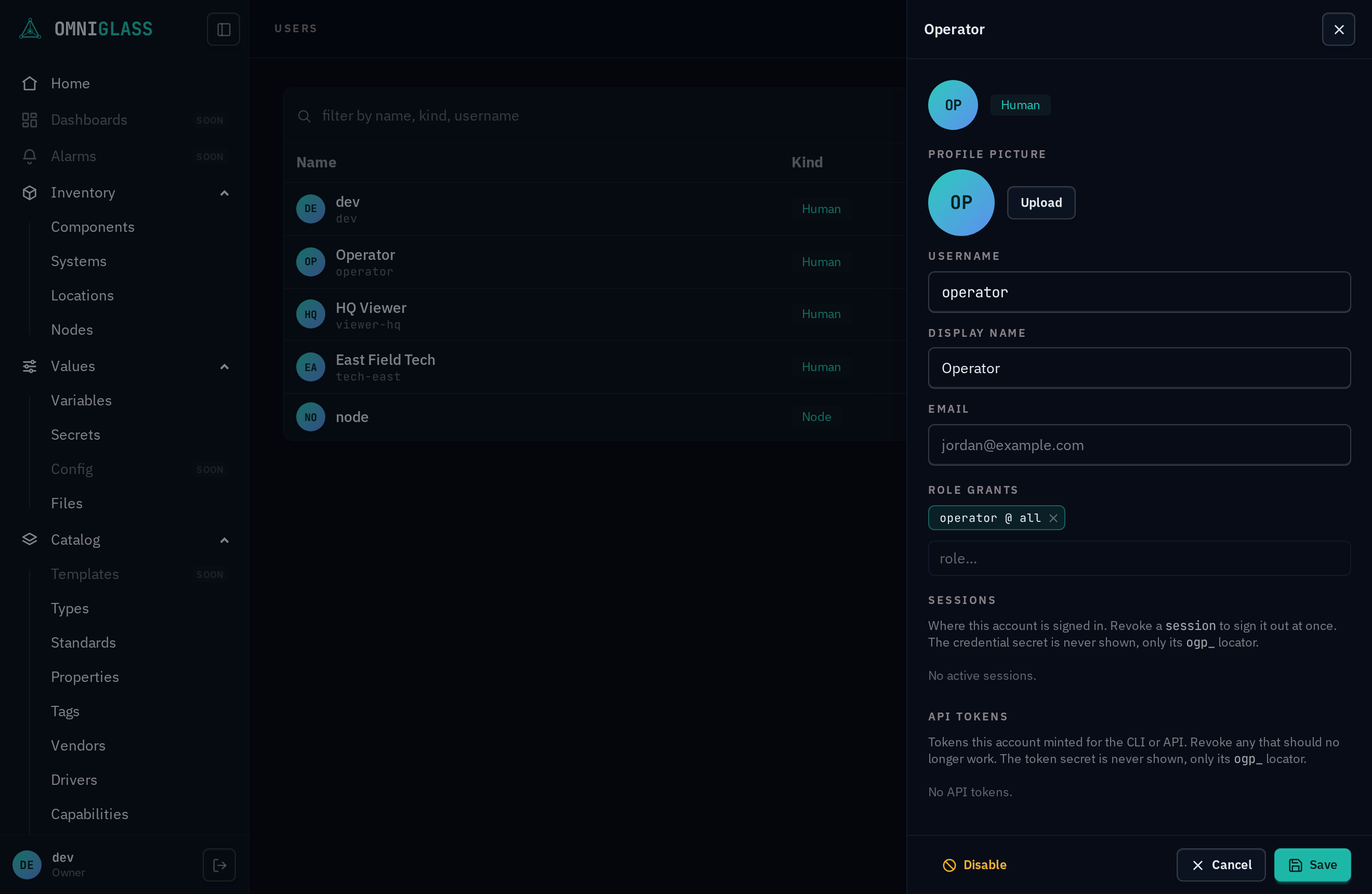
Type a role, then Tab
or Enter to the scope kind, then (for a non-all scope) the specific location, system, or
component from an indented tree, then the operator that says how that entity matches the tree:
each commit becomes a role @ operator scope chip. The operator is one of at or under (≥,
the entity and everything beneath it, the default), under only (>, the descendants but not
the entity itself, for update and delete), or just this (=, exactly the one entity, no
descendants and no adding children under it), so you can grant a field tech the rooms inside a
building without letting them rename the building, or lock an operator to a single node. A scope
kind reaches its own tier only, so a field tech who also works the systems and components in that
building needs a grant on each of those tiers beside the location one. Removing an existing grant marks it (dimmed and
struck, undoable), staging a new one shows it in green, and a pending-diff line (“+N to grant, -M
to revoke”) previews exactly what Save will do. A
scope targets the entity by its internal id, so a grant survives a rename of that entity. One rule
the server always holds: the last owner grant cannot be revoked, so the platform can never be
locked out of administration.
Hovering a role in the picker shows its description and the permissions it grants, so you can see what you are assigning before you stage it.
From the CLI a direct grant is omniglass principal grant create <id> / omniglass principal grant delete <id> <grantId>.